Pages

Thursday, 17 May 2012

Error while starting managed server in OBIEE 11.1.1.5:The persistent file store "_WLS_bi_server1" cannot open file _WLS_BI_SERVER1000000.DAT


While starting managed server we got the error as


weblogic.store.PersistentStoreException: [Store:280105]The persistent file store "_WLS_bi_server1" cannot open file _WLS_BI_SERVER1000000.DAT.
        at weblogic.store.io.file.Heap.open(Heap.java:325)
        at weblogic.store.io.file.FileStoreIO.open(FileStoreIO.java:104)
        at weblogic.store.internal.PersistentStoreImpl.recoverStoreConnections(PersistentStoreImpl.java:431)
        at weblogic.store.internal.PersistentStoreImpl.open(PersistentStoreImpl.java:422)
        at weblogic.store.admin.AdminHandler.activate(AdminHandler.java:126)


Solution:


1. Go to $BI_DOMAIN_HOME


2. find _WLS_BI_SERVER1000000.DAT file as below 


$ find -name "*.DAT"
./servers/AdminServer/data/store/diagnostics/WLS_DIAGNOSTICS000000.DAT
./servers/AdminServer/data/store/default/_WLS_ADMINSERVER000000.DAT
./servers/bi_server1/data/store/diagnostics/WLS_DIAGNOSTICS000000.DAT
./servers/bi_server1/data/store/default/_WLS_BI_SERVER1000000.DAT
./BipJmsStore/BIPJMSSTORE000000.DAT


3.go to the location and then romove it else rename it


$ cd ./servers/bi_server1/data/store/default/
$ ls -lrt
total 1032
-rw-r----- 1 oracle oinstall 1049088 May 17 07:29 _WLS_BI_SERVER1000000.DAT
$ mv _WLS_BI_SERVER1000000.DAT _WLS_BI_SERVER1000000.DAT_old


4. start the managed server as below.


$ cd /orasw/MW5/user_projects/domains/bifoundation_domain/bin
$ nohup ./startManagedWebLogic.sh bi_server1 http://tudevlv0337.us.oracle.com:10000 >startManagedWebLogic.log &


Monday, 14 May 2012

Workflow 2.6.4 Configuration In Database 11g Fails With error "WFCA OUT: Error: Could not connect to the remote server."

While installing Oracle workflow in 11g, it fails with error as "WFCA OUT: Error: Could not connect to the remote server. Please check if the server is down or the client is using invalid host, ORMI port or password to connect: Connection refused".

Error in workflow log is as below.
WorkflowCA: Executing: /orasw/app/oracle/product/11.2.0.2_db/jdk/bin/java -jar /orasw/app/oracle/product/11.2.0.2_db/oc4j/j2ee/home/admin.jar ormi://slc00uzk.us.oracle.com:6041 oc4jadmin welcome -application WFMLRSVCApp -installDataSource -url jdbc:oracle:thin:@(DESCRIPTION=(ADDRESS_LIST=(ADDRESS=(PROTOCOL=TCP)(HOST=slc00uzk.us.oracle.com)(PORT=1521)))(CONNECT_DATA=(SERVICE_NAME=B12402Q2))) -username OWFMGR -password ->pwForOwfMgr -className com.evermind.sql.DriverManagerDataSource -location jdbc/WorkflowDS -xaLocation jdbc/xa/WorkflowDS -ejbLocation jdbc/WorkflowDS -connectionDriver oracle.jdbc.driver.OracleDriver

WFCA OUT: Error: Could not connect to the remote server. Please check if the server is down or the client is using invalid host, ORMI port or password to connect: Connection refused
WorkflowCA: Exit Val: 2
WorkflowCA:  Created a redirected data source with application WFMLRSVCApp :
WorkflowCA: Executing: /orasw/app/oracle/product/11.2.0.2_db/jdk/bin/java -Djava.security.properties=/orasw/app/oracle/product/11.2.0.2_db/oc4j/j2ee/home/config/jazn.security.props -Doracle.security.jazn.config=/orasw/app/oracle/product/11.2.0.2_db/oc4j/j2ee/OC4J_Workflow_Component_Container/config/jazn.xml -jar /orasw/app/oracle/product/11.2.0.2_db/oc4j/j2ee/home/jazn.jar -user oc4jadmin -password welcome -adduser jazn.com pwForOwfMgr
The specified user already exists in the system.
WorkflowCA:   Created obfusticated password for redirect datasource:
WorkflowCA: Executing: /orasw/app/oracle/product/11.2.0.2_db/jdk/bin/java -jar /orasw/app/oracle/product/11.2.0.2_db/oc4j/j2ee/home/admin.jar ormi://slc00uzk.us.oracle.com:6041 oc4jadmin welcome -shutdown
WFCA OUT: Error: Could not connect to the remote server. Please check if the server is down or the client is using invalid host, ORMI port or password to connect: Connection refused
WorkflowCA: Exit Val: 2
WorkflowCA:   Executed OC4J Admin script to shut down the OC4J instance :
WorkflowCA: Sun May 13 23:50:13 PDT 2012
WorkflowCA: Workflow Configuration has completed with error.
WorkflowCA: Terminating...

Solution:
Oracle Workflow will not check for or allocate a free port during the installation.By default http-web-site.xml uses port 6004 and rmi.xml uses port 6101. If either or both of these ports are in use by other processes, the Oracle Workflow Configuration Assistant will error out when trying to deploy Workflow Applications. To solve this issue, follow the below steps.


1. Check ports which are not in use as below

#> netstat -atnp|grep LISTEN |grep 6102
(Not all processes could be identified, non-owned process info
 will not be shown, you would have to be root to see it all.)
oracle@slc00uzk.us.oracle.com /orasw/app/oracle/product
#> netstat -atnp|grep LISTEN |grep 6009
(Not all processes could be identified, non-owned process info
 will not be shown, you would have to be root to see it all.)

and also you can check ports which are not in use as below.

#> telnet slc00uzk.us.oracle.com 6102
Trying 10.241.39.115...
telnet: connect to address 10.241.39.115: Connection refused
telnet: Unable to connect to remote host: Connection refused
oracle@slc00uzk.us.oracle.com /orasw/app/oracle/product
#> telnet slc00uzk.us.oracle.com 6009
Trying 10.241.39.115...
telnet: connect to address 10.241.39.115: Connection refused
telnet: Unable to connect to remote host: Connection refused


2. Make a backup copy of :
- $ORACLE_HOME/oc4j/j2ee/OC4J_Workflow_Management_Container/config/rmi.xml
- $ORACLE_HOME/oc4j/j2ee/OC4J_Workflow_Component_Container/config/http-web-site.xml

3. Modify "port=6101" and "web-site port=6004" to other available ports which can be checked by using the netstat command

4. Re-run Oracle Workflow Configuration Assistant
as below

cd $ORACLE_HOME/owb/wf/install/wfinstall.csh


Thursday, 10 May 2012

error ORA-27154: post/wait create failed while starting up database

We got below error while starting up the database.


$ sqlplus '/as sysdba'

SQL*Plus: Release 11.2.0.2.0 Production on Thu May 10 03:14:49 2012

Copyright (c) 1982, 2010, Oracle.  All rights reserved.

Connected to an idle instance.

SYS@BI2400R1 AS SYSDBA 10-MAY-12> startup;
ORA-27154: post/wait create failed
ORA-27300: OS system dependent operation:semget failed with status: 28
ORA-27301: OS failure message: No space left on device
ORA-27302: failure occurred at: sskgpcreates

Solution: This is caused by Kernel parameter setting. Since we were running many databases on a server, we should check our semaphore. Recommended value is

# semaphores: semmsl, semmns, semopm, semmni 
kernel.sem = 250 32000 100 128

In our case it's 

$ /sbin/sysctl -a | grep sem
error: permission denied on key 'kernel.cad_pid'
kernel.sem = 250        32000   100     142

and still we were getting the error as more than 15 databases were running on the server.

We increased the value to 275 as below

# /sbin/sysctl -w kernel.sem=275
added this new value into /etc/sysctl.conf in order the changes persist after system boot
  
and then started the DB.

$ . oraenv
ORACLE_SID = [B12400D1] ? BI2400R1
The Oracle base remains unchanged with value /orasw/app/oracle_test
$ sqlplus '/as sysdba'

SQL*Plus: Release 11.2.0.2.0 Production on Thu May 10 03:18:24 2012

Copyright (c) 1982, 2010, Oracle.  All rights reserved.

Connected to an idle instance.

SYS@BI2400R1 AS SYSDBA 10-MAY-12> startup;
ORACLE instance started.

Total System Global Area 1603411968 bytes
Fixed Size                  2226912 bytes
Variable Size             788530464 bytes
Database Buffers          805306368 bytes
Redo Buffers                7348224 bytes
Database mounted.
Database opened.
SYS@BI2400R1 AS SYSDBA 10-MAY-12> exit


Tuesday, 27 March 2012

Installing Oracle Grid Infrastructure for a Standalone Server


Perform the following steps to install Oracle Grid Infrastructure on a stand alone server.

Oracle Grid Infrastructure installs Oracle Restart and Oracle ASM and you can configure Oracle ASM with at least one disk group during configuration. Once grid installation is completed,install Oracle Database that stores database files in Oracle ASM disk groups.

1.Go to software location and Start Oracle Universal Installer as the Oracle Grid Infrastructure software owner user(eg:Oracle).

2.Start the installer with the command
$ ./runInstaller

3.On the first screen of the installer, select Install and Configure Grid Infrastructure for a Standalone Server. Click Next.


4.On the Select Product Languages screen, select one or more languages.


5. On the CreateASMDiskGroup screen,The Create ASM Disk Group screen lists all the Oracle ASM disks.

Click Change Discovery Path to select any devices to be used by Oracle ASM.In the Change Disk Discovery Path window, enter a string to use to search for devices that Oracle ASM will use. Click OK. In our example, I selected path as "/dev/*"

    * Set Redundancy to Normal
    * Select the disks: /dev/sdb1, /dev/sdc1
    * Click Next


Note:During installation, disk paths mounted on Oracle ASM and registered on ASMLIB with the string ORCL:* are listed as default database storage candidate disks


6. On the Specify ASM Password page,

    * Select 'Use same passwords for these accounts'
    * Enter your password
    * Confirm the password
    * Click Next


When you get warning on weak password, click Yes.

7.  In the Privileged Operating System Groups screen, select the name of the operating system group you created for the OSDBA group, the OSASM group, and the database operator group OSOPER.

If you create only the dba group, then you can use that group for all three privileged groups.
If you created a separate asmadmin group, then use that value for the OSASM group. Click Next.

Note:These groups do not allow for job role separation. So a warning will appear. Click Yes


8.   On the Specify Installation Location page, the location of the database home will be shown

    * Set the Software Location to /u01/app/oracle/product/11.2.0/grid.
    * Set the Oracle Base to /u01/app/oracle
    * Click Next


9.select location for Inventory.


10. The Perform Prerequisite Check page appears and completes the checks.

Since the swap size and also some kernel parameters values were sufficient for testing purpose, I ignored the below errors. If it's for production, correct these errors and proceed.


On the Summary page, the installation settings are shown. Click Finish to complete the installation.

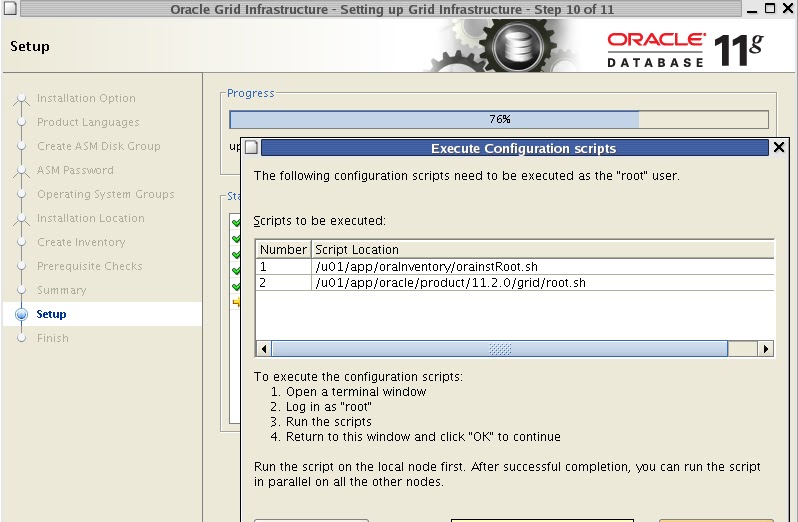
11. The setup page shows the install progress 


12. The Execute Configuration Scripts page asks you to execute a configuration script as the root user.

    * Open a terminal window.
    * connect as the root user.


Copy the script name from the Execute Configuration Scripts page into to the terminal window and execute it with root user.


13. When the script has completed, Click OK in the Execute Configuration Scripts page.


14.When the Finish page appears, with the message "The installation of Oracle Grid Infrastructure for single Server was successful", click Close 


Oracle ASMCA is installed as part of the Oracle Grid Infrastructure for a Standalone Server installation. To create additional disk groups, run the Oracle ASMCA utility as below.

Go to $GRID_HOME/bin and execute asmca as below
./asmca


To verify that the Oracle High Availability Service is installed properly, run ./crsctl check has command from Grid_home/bin directory.

[oracle@testdb bin]$ ./crsctl check has
CRS-4638: Oracle High Availability Services is online

To check the ASM. Connect to the ASM as below and check the diskgroup.

[oracle@testdb bin]$ . oraenv
ORACLE_SID = [oracle] ? +ASM
The Oracle base for ORACLE_HOME=/u01/app/oracle/product/11.2.0/grid is /u01/app/oracle
[oracle@testdb bin]$ sqlplus '/as sysdba'

SQL*Plus: Release 11.2.0.1.0 Production on Sun Mar 18 16:24:51 2012

Copyright (c) 1982, 2009, Oracle.  All rights reserved.


Connected to:
Oracle Database 11g Enterprise Edition Release 11.2.0.1.0 - Production
With the Automatic Storage Management option

SQL> select name,type from v$asm_diskgroup;

NAME                           TYPE
------------------------------ ------
DATA                           NORMAL

Wednesday, 21 March 2012

ORA-01031: insufficient privileges while connecting to database as sysdba

While I was trying to connect to the database, which was created recently, I was getting error as


#> sqlplus '/as sysdba'

SQL*Plus: Release 10.2.0.1.0 - Production on Wed Mar 21 02:52:18 2012

Copyright (c) 1982, 2005, Oracle.  All rights reserved.

ERROR:
ORA-01031: insufficient privileges


Enter user-name:
oracle@test.sangam /orasw/app/oracle/product/10.2.0/bin

Solution:


1. Check the  uid and gid of an oracle user. 

#> id oracle
uid=1014(oracle) gid=3005(oinstall) groups=100(users),3004(dba),3005(oinstall),8500(oemdba)

But the problem was db was created giving "users" as dbagroup.

You can check this in $ORACLE_HOME/rdbms/lib/config.c or $ORACLE_HOME/rdbms/lib/config.s file (depends on the OS type)

Eg:

#> cat config.c

/*  SS_DBA_GRP defines the UNIX group ID for sqldba adminstrative access.  */
/*  Refer to the Installation and User's Guide for further information.  */

/* IMPORTANT: this file needs to be in sync with
              rdbms/src/server/osds/config.c, specifically regarding the
              number of elements in the ss_dba_grp array.
 */

#define SS_DBA_GRP "users"
#define SS_OPER_GRP "users"
#define SS_ASM_GRP ""

char *ss_dba_grp[] = {SS_DBA_GRP, SS_OPER_GRP, SS_ASM_GRP};

Once file is updated, relink the oracle binaries as below
export LD_LIBRARY_PATH=$ORACLE_HOME/lib
export PATH=$ORACLE_HOME/bin:$PATH
 $ORACLE_HOME/bin/relink all
writing relink log to: /oracle/product/11.2.0/install/relink.log


2.check the same thing exist in /etc/passwd file.

#> cat /etc/passwd |grep oracle
oraem:x:24872:8500::/opt/oracle/oraem:/bin/csh
oracle:x:1014:3005::/orasw:/usr/bin/ksh
root@test.sangam /orasw/app/oracle/product/10.2.0

3.Check the permissions of all oracle binaries.

4.Assign the "users" group gid to "oracle" by editing /etc/passwd file.

 #> cat /etc/passwd |grep oracle
oraem:x:24872:8500::/opt/oracle/oraem:/bin/csh
#oracle:x:1014:3005::/orasw:/usr/bin/ksh
oracle:x:1014:100::/orasw:/usr/bin/ksh
root@test.sangam /orasw/app/oracle/product/10.2.0

5. Now try to connect to the database. You would be able to connect to the database.


#> . oraenv
ORACLE_SID = [TESTDB] ?
oracle@test.sangam /orasw/app/oracle/product/10.2.0/bin
#> sqlplus '/as sysdba'

SQL*Plus: Release 10.2.0.1.0 - Production on Wed Mar 21 02:59:12 2012

Copyright (c) 1982, 2005, Oracle.  All rights reserved.

Connected to an idle instance.

SQL> startup;
ORACLE instance started.

Total System Global Area 1073741824 bytes
Fixed Size                  2026224 bytes
Variable Size             272631056 bytes
Database Buffers          792723456 bytes
Redo Buffers                6361088 bytes
Database mounted.
Database opened.
SQL>


Thursday, 15 March 2012

Error in invoking target 'client_sharedlib' of makefile '/u01/app/oracle/product/10.2.0.3/db_1/network/lib/ins_net_client.mk' while installing 10g database software

While installing oracle 10g software, It threw error as
"Error in invoking target 'client_sharedlib' of makefile '/u01/app/oracle/product/10.2.0.3/db_1/network/lib/ins_net_client.mk' "


Solution: Check the software you are using. Probably you are using 64 bit OS software for 32 bit operating system.

Tuesday, 13 March 2012

ORA-00600: internal error code, arguments: [spstp: ORACLE_HOME uid does not match euid]

Recently, all databases went down because of uid of "oracle" user was changed by system admin. When I tried to bring up the database, got error as

04:02:31 SYS@MDMDV7>startup;
ORA-27121: unable to determine size of shared memory segment
Linux-x86_64 Error: 13: Permission denied
04:02:35 SYS@MDMDV7>exit


and in the alter log, the error was


Errors in file /orasw/app/oracle/admin/MDMDV7/bdump/diag/rdbms/mdmdv7/MDMDV7/trace/MDMDV7_w000_27702.trc  (incident=79650):
ORA-00600: internal error code, arguments: [spstp: ORACLE_HOME uid does not match euid], [1014], [54321], [], [], [], [], [], [], [], [], []
Incident details in: /orasw/app/oracle/admin/MDMDV7/bdump/diag/rdbms/mdmdv7/MDMDV7/incident/incdir_79650/MDMDV7_w000_27702_i79650.trc
Errors in file /orasw/app/oracle/admin/MDMDV7/bdump/diag/rdbms/mdmdv7/MDMDV7/incident/incdir_79650/MDMDV7_w000_27702_i79650.trc:
ORA-00600: internal error code, arguments: [spstp: ORACLE_HOME uid does not match euid], [1014], [54321], [], [], [], [], [], [], [], [], []
Process W000 died, see its trace file
Tue Mar 13 03:33:05 2012
Errors in file /orasw/app/oracle/admin/MDMDV7/bdump/diag/rdbms/mdmdv7/MDMDV7/trace/MDMDV7_w000_27708.trc  (incident=79658):
ORA-00600: internal error code, arguments: [spstp: ORACLE_HOME uid does not match euid], [1014], [54321], [], [], [], [], [], [], [], [], []
Incident details in: /orasw/app/oracle/admin/MDMDV7/bdump/diag/rdbms/mdmdv7/MDMDV7/incident/incdir_79658/MDMDV7_w000_27708_i79658.trc
Errors in file /orasw/app/oracle/admin/MDMDV7/bdump/diag/rdbms/mdmdv7/MDMDV7/incident/incdir_79658/MDMDV7_w000_27708_i79658.trc:
ORA-00600: internal error code, arguments: [spstp: ORACLE_HOME uid does not match euid], [1014], [54321], [], [], [], [], [], [], [], [], []

and file permissions were being shown as

drwxr-xr-x 2  54321 oinstall       4096 Feb 26 23:40 DXTRNSL
drwxr-xr-x 2  54321 oinstall       4096 Mar  6 05:29 D72000I1

oracle@sfogbu015.us.oracle.com /mdm_oradata_02


Solution:
1. Change the file permission to oracle user

chown -R oracle:oinstall data_file_folder

chown -R oracle:oinstall $ORACLE_BASE folder


2.reboot the server with root user

#> reboot
Broadcast message from root (pts/6) (Tue Mar 13 04:23:04 2012):

The system is going down for reboot NOW!

3.Bring up the databases now

#> sqlplus '/as sysdba'

SQL*Plus: Release 11.2.0.1.0 Production on Tue Mar 13 04:18:44 2012

Copyright (c) 1982, 2009, Oracle.  All rights reserved.

Connected to an idle instance.

04:18:47 SYS@MDMDV7>startup;
ORACLE instance started.

Total System Global Area 1068937216 bytes
Fixed Size                  2220200 bytes
Variable Size             457183064 bytes
Database Buffers          603979776 bytes
Redo Buffers                5554176 bytes
Database mounted.
Database opened.